Tokens are the characters and creatures on a battle map. They belong to the campaign, so each group has its own on the same map.
Place tokens
- Open a battle map and pick Tokens on the tool strip.
- On the Add tab:
- Place the party puts every active character on the map at once (click where they should stand). Or drag one character onto the map.
- Under Encounters, drag an encounter’s creatures onto the map.
- Under Compendium, search for a monster, set How many and drag it on.
- Custom token adds anything else: a horse, a cart, a statue.
You can also place an encounter’s creatures from the encounter itself with Place on map.
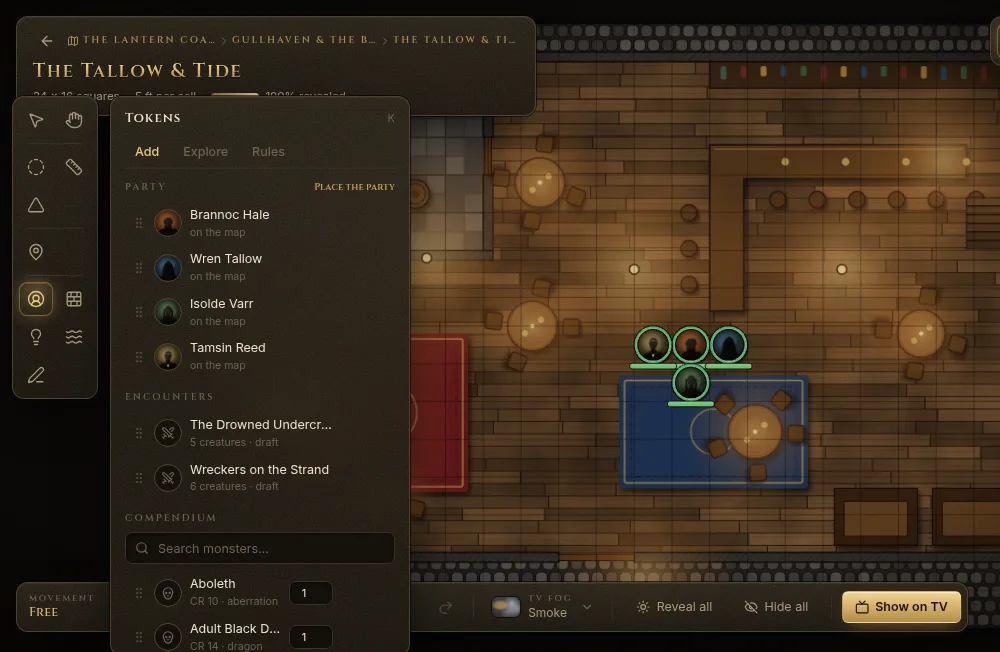
Hostile tokens from encounters and the compendium can start hidden: turn on Place monsters hidden on the Rules tab.
The token HUD
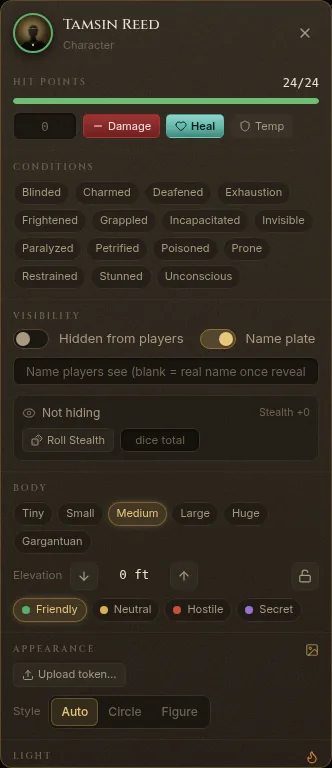
Right-click a token to open its HUD:
- Hit points — type an amount and click Damage, Heal or Temp.
- Conditions — click to toggle Blinded, Prone, Restrained and the rest.
- Visibility — Hidden from players, the Name plate, and the name players see (blank = the real name once revealed). Creatures can also Roll Stealth to hide.
- Body — size (Tiny to Gargantuan) and Elevation ([ and ]).
- Disposition — Friendly, Neutral, Hostile or Secret — and Lock for players.
- Light — a torch, lantern, the Light cantrip and more, for vision.
- Appearance — change the image, or draw it as a Circle or a frameless Figure.
Hit points and conditions need the token to be linked to a character or a combatant. Double-click a token to open its character sheet, encounter or wiki page.
Move tokens
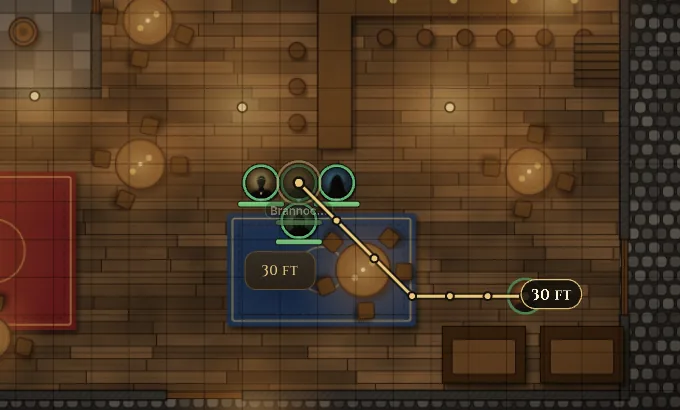
Drag a token. The path follows the grid around walls and shows the distance, using the token’s speed and the 2024 movement rules. While dragging:
- W or right-click adds a waypoint, Backspace removes it, Esc cancels.
- Warnings appear along the way: Difficult terrain, A wall is in the way, Closed door, A hostile creature’s space, Squeezing (×2), falls, and Over the movement left — Dash?. Fablekeep also tells you when a move provokes an opportunity attack.
- Hold Alt as you drop to force a move (the DM override).
From the keyboard, select tokens and step them one cell with W A S D or the arrows, and diagonally with Q E Z C. Alt+W steps through walls.
Player movement
The Movement switch at the bottom left of the map decides how players move their own tokens (online and hybrid play):
- Free — players move their own tokens; in combat, turn and speed rules still apply.
- Ask — each move waits for your approval: you see the path and approve or deny it.
- Locked — players can’t move their tokens, even on their turn. Good for narration and cut scenes.
Shift+M cycles through them.
Rules for the table
The Rules tab of the Tokens panel holds the table rules: Turn lock in combat, Camera follows the active token (on the TV and the players’ screens), Players see allies’ exact HP, Passive Perception reveals secrets, Place monsters hidden, a Turn timer, and Figure tokens for cut-outs.
Explore: marching order and secrets
The Explore tab helps outside combat:
- Marching order — add party tokens front to back, choose how many abreast, then click where the party walks to (March the party…).
- Perception secrets — place traps, secret doors and hidden objects with a DC and a radius. They are revealed automatically when a party token with a high enough passive Perception comes within range with line of sight.
What players see
Players never see hidden tokens, your notes or exact hit points of monsters. A monster’s health shows as a word (Hurt, Bloodied, Near death…). With vision on, tokens out of the party’s sight stay hidden on the TV.