Fablekeep is quick to drive from the keyboard. Press ? anywhere in the DM app to open the Keyboard shortcuts sheet: it lists every shortcut below and has a search box (try “fog”, “take” or “Ctrl”). You can also open it from Help & shortcuts at the bottom of the left rail, or from Settings → Help & tour.
Shortcuts never fire while you are typing in a text box.
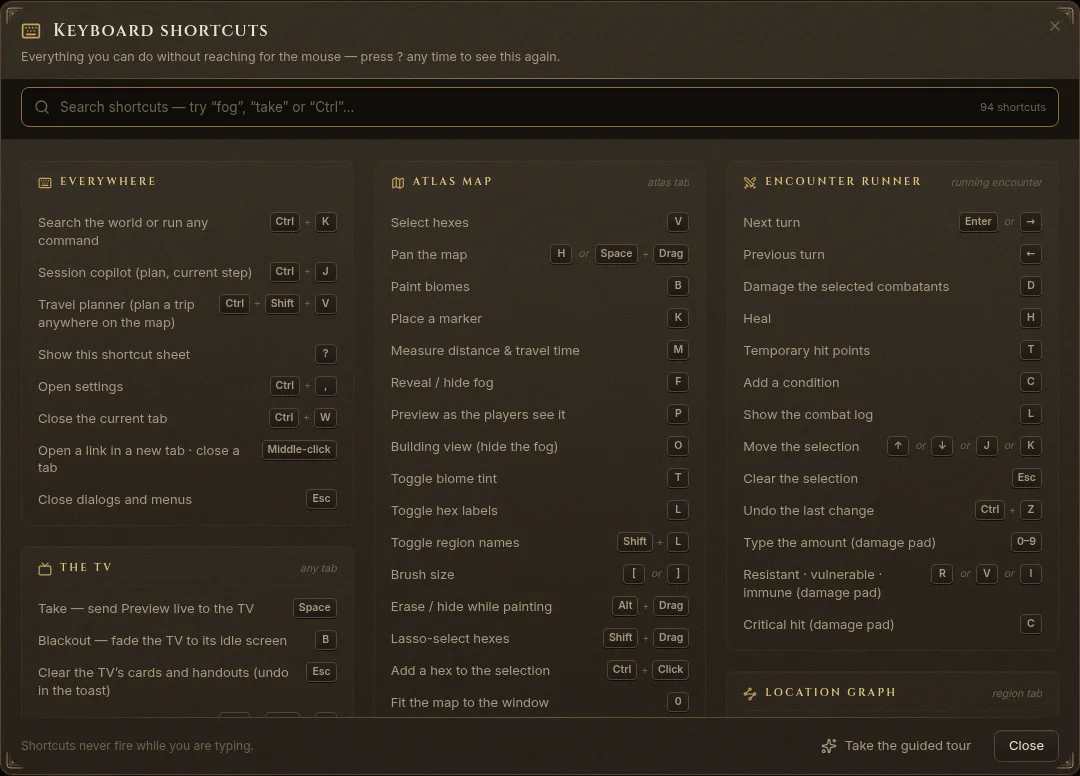
Everywhere
| Keys | What it does |
|---|---|
| Ctrl+K | Search the world or run any command |
| Ctrl+J | Session copilot (plan, current step) |
| Ctrl+Shift+V | Travel planner (plan a trip anywhere on the map) |
| ? | Show this shortcut sheet |
| Ctrl+, | Open settings |
| Ctrl+W | Close the current tab |
| Middle-click | Open a link in a new tab · close a tab |
| Esc | Close dialogs and menus |
The TV
Works in: any tab.
| Keys | What it does |
|---|---|
| Space | Take — send Preview live to the TV |
| B | Blackout — fade the TV to its idle screen |
| Esc | Clear the TV’s cards and handouts (undo in the toast) |
| Ctrl+Shift+D | Open or close the TV window |
| Shift+Click | Open TV on another screen (Shift-click Open TV) |
| PgDn / PgUp | Next / previous page of a long card, read-aloud or handout on the TV |
| Alt+PgDn / Alt+PgUp | Same, in battle maps and multi-level scenes (PgDn / PgUp switch levels there) |
| → / ← | Handout on the TV: next / previous paragraph or page (also PgDn / PgUp) |
| Q | Quick switch: battle map ⇄ travel map on the focused pane |
| Shift+Q | Quick switch on every pane |
At the table
Works in: Play mode.
| Keys | What it does |
|---|---|
| N | Quick session note |
| º / ` | Open the soundpad (top bar) |
| Alt+1…0 | Fire a soundpad pad (anywhere) |
| W | Read the wiki entry of the selected pin, place or entry (quick look) |
Atlas map
Works in: atlas tab.
| Keys | What it does |
|---|---|
| V | Select hexes |
| H / Space+Drag | Pan the map |
| B | Paint biomes |
| K | Place a marker |
| M | Measure distance & travel time |
| F | Reveal / hide fog |
| P | Preview as the players see it |
| O | Building view (hide the fog) |
| T | Toggle biome tint |
| L | Toggle hex labels |
| Shift+L | Toggle region names |
| [ / ] | Brush size |
| Alt+Drag | Erase / hide while painting |
| Shift+Drag | Lasso-select hexes |
| Ctrl+Click | Add a hex to the selection |
| 0 | Fit the map to the window |
| + / − | Zoom in / out |
Battle maps
Works in: battle-map tab.
| Keys | What it does |
|---|---|
| V | Move & select |
| H | Pan |
| F | Fog brush |
| M | Measure (shared with the TV) |
| T | Area-of-effect template |
| P | Note pin |
| R / Shift+R | Rotate the template |
| Alt+Drag | Hide instead of reveal |
| [ / ] | Brush size |
| Shift+P | Preview as players |
| G | Toggle the grid |
| Delete | Delete the selected template or pin |
| Ctrl+Z | Undo fog |
| Ctrl+Shift+Z | Redo fog |
| 0 | Fit the scene |
| W / A / S / D / ↑ | Step the selected token(s) one cell (Select / Tokens tool; arrows too) |
| Q / E / Z / C | Diagonal step |
| Alt+W | Step through walls (DM override) |
Encounter runner
Works in: running encounter.
| Keys | What it does |
|---|---|
| Enter / → | Next turn |
| ← | Previous turn |
| D | Damage the selected combatants |
| H | Heal |
| T | Temporary hit points |
| C | Add a condition |
| L | Show the combat log |
| ↑ / ↓ / J / K | Move the selection |
| Esc | Clear the selection |
| Ctrl+Z | Undo the last change |
| 0–9 | Type the amount (damage pad) |
| R / V / I | Resistant · vulnerable · immune (damage pad) |
| C | Critical hit (damage pad) |
Location graph
Works in: region tab.
| Keys | What it does |
|---|---|
| N | New location |
| P | Preview as players |
| 0 | Fit the graph |
| Delete | Delete the selected place or path |
Timeline
Works in: timeline tab.
| Keys | What it does |
|---|---|
| + / − | Zoom the timeline |
| N / Home | Jump to now |
| F | Fit everything |
Audio
Works in: audio tab.
| Keys | What it does |
|---|---|
| 1…0 | Fire soundboard slots |
| Alt+1…0 | Soundboard from any tab |
Map Forge
Works in: forge editor.
| Keys | What it does |
|---|---|
| [ / ] | Brush size |
| Space+Drag | Pan the canvas |
| F | Fit to the window |
| Delete | Delete the selected feature |
| Ctrl+Z | Undo |
| Ctrl+Y | Redo |
Writing
Works in: notes & pages.
| Keys | What it does |
|---|---|
| / | Insert a block (secret, read-aloud, table…) |
| @ | Link an NPC, place or quest |
| Ctrl+B | Bold |
| Ctrl+I | Italic |
| # / ## | Heading (at the start of a line) |
| - / 1. | Bulleted / numbered list |
| Ctrl+S | Save (compendium editors) |