A couple of small jobs in Fablekeep can use an AI model if you give it one: suggesting NPC names and drafting a session recap. A cheap, fast model is plenty. Without it, both still work with Fablekeep’s built-in generators.
You need AI features turned on to see these settings.
Set up a model
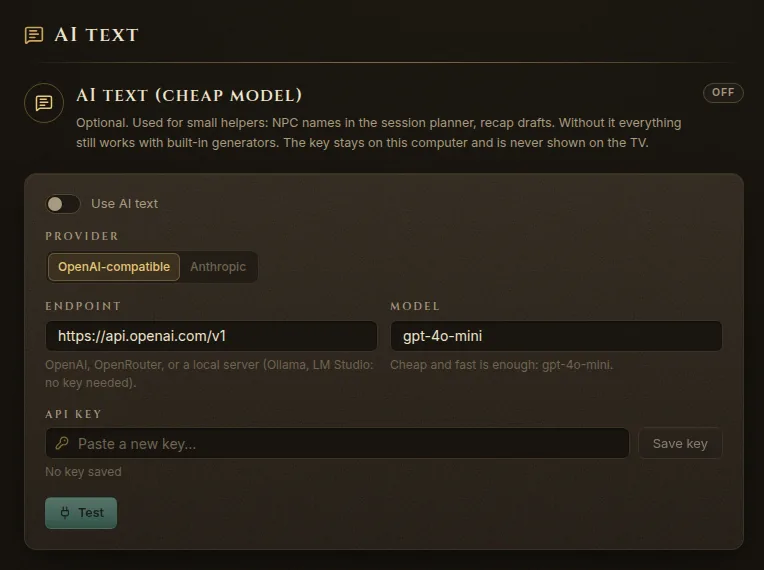
- Open Settings (Ctrl+,) and go to AI text.
- Choose a Provider:
- OpenAI-compatible — OpenAI, OpenRouter, or a model running on your own computer with Ollama or LM Studio.
- Anthropic — Claude models with your Anthropic API key.
- Check the Endpoint. Each provider fills in its own; for a local server, type its address instead (Ollama and LM Studio show it in their own settings).
- Type the Model name. The default is a cheap, fast one, and that is all these helpers need.
- Paste your API key and click Save key. Local servers need no key.
- Click Test. When it works, you’ll see “The model answered: …”.
- Turn on Use AI text.
The badge at the top shows Ready, Needs an API key or Off.
Where it’s used
NPC names
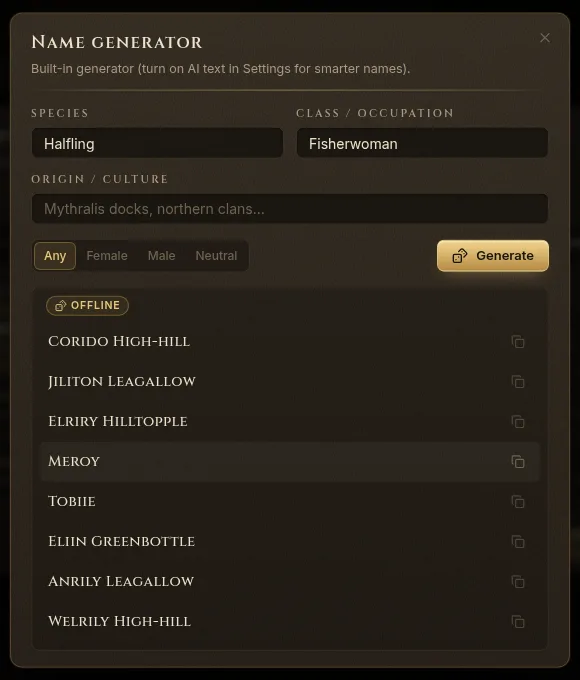
The name generator appears when you create an NPC (Generate a name in the new-page dialog) and on a session plan step, next to NPCs here (Name).
- Fill in what you know: Species, Class / occupation, Origin / culture, and a gender if you like.
- Click Generate. You get eight names, labelled AI or Offline depending on where they came from.
- Click Create NPC to add one to the wiki, or Copy / use to use the name.
With AI text off, the built-in generator makes the names. If the model doesn’t answer, Fablekeep falls back to the built-in generator and tells you; Try the offline generator does it on purpose.
Recap drafts
On a session’s Recap tab, Draft from the plan writes a recap from the scenes you played and the clues you delivered. With AI text on, the model turns that into prose for the players; without it, you get a plain list to edit. Either way it’s a draft: read it and edit it before you show it on the TV.
Draft a recap with Claude, by hand
You don’t need any AI setting for this. In the End session dialog, or on the session’s Recap tab:
- Click Draft recap with Claude. Fablekeep copies a ready-made prompt to the clipboard.
- Paste it into Claude (or another AI chat you use) and send it.
- Copy the answer, go back to Fablekeep and click Paste draft (in the End session dialog), or paste it into the recap yourself.
Secret blocks never reach the TV when you show “Previously on…”, but read the recap anyway before you show it.