At the table, each player’s phone becomes their character sheet. It opens in the phone’s web browser — nothing to install — and stays in step with your desk: hit points, rolls, handouts and quests arrive as you play.
Joining
You invite each player once (see Your first session): Settings → Players → Invite a player, tick the character, Create invite. The player then:
- Scans the QR code, opens the Invite link, or opens Fablekeep’s address and taps I have an invite code to type the Invite code.
- Types Your name — the name the DM and the other players see — and taps Continue.
- Chooses a PIN of at least 4 digits, types it again under Repeat the PIN, and taps Join the campaign.
The phone stays signed in. Next time the player just opens the same address.
On another device, the player picks their name and types the PIN, then taps Take your seat. If they forget the PIN, open the player in Settings → Players and give them a new invite (or set a new PIN for them).
The header
At the top of every tab:
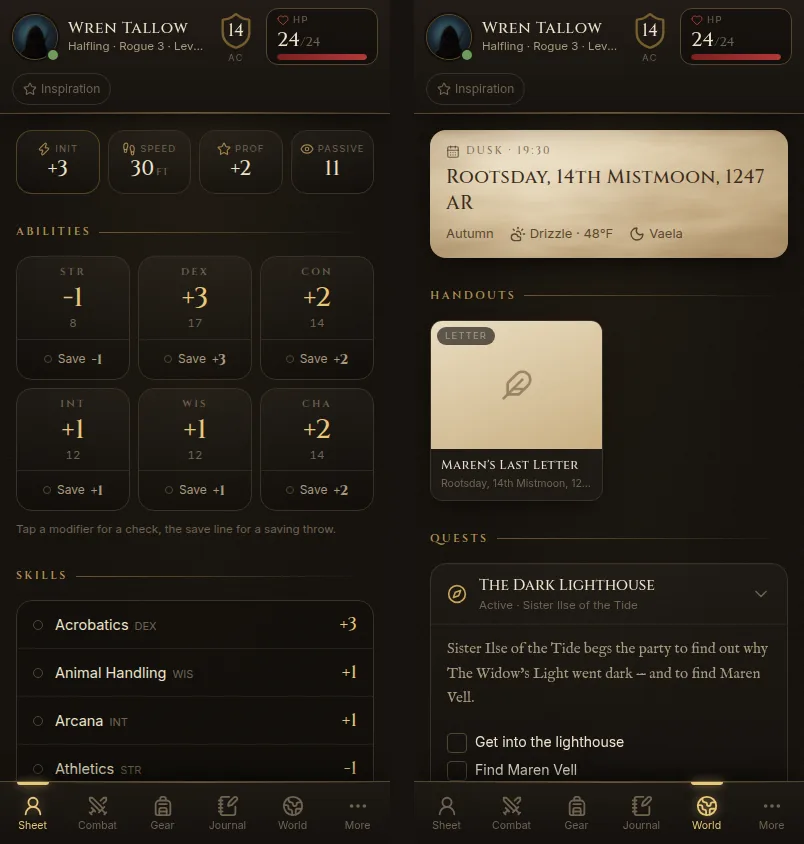
- the character’s portrait, name, species, class and level;
- AC;
- HP — tap it to record Damage, Heal or Temp HP. Damage takes temporary hit points first.
- Inspiration, which the player can tick on and off.
The tabs
The bar at the bottom has Sheet, Combat, Spells (for spellcasters), Gear, Journal, World and More. Players who play remotely also get Map.
Sheet
Initiative, speed, proficiency bonus and passive Perception, the six abilities with their saves, skills and passive scores, proficiencies and languages.
- Tap an ability’s modifier for a check, or its Save line for a saving throw. Tap a skill to roll it.
- Rests & Hit Dice: Short rest, Long rest and Spend Hit Dice.
- At 0 hit points, Death saves appear, with Roll a death save.
Combat
Out of a fight it says “No fight right now” and shows the character’s initiative bonus. In a fight it shows the round and Your turn!, plus the character’s attacks, actions and reactions with their to-hit and damage dice.
When you start an encounter, players get Roll for initiative! on their phone and their result goes straight to you.
Spells
Spell save DC, spell attack, slots left per level, and every spell with its card. Casting spends a slot.
Gear
Everything the character carries, with a search box and filters (Equipped, Weapons, Armor, Consumables…), the equipment slots and carried weight. Tap any item to read its card. Each item has a private note only the player and you can read.
Players can Add item from the compendium or as a custom item. By default this is a request: it waits as Waiting for the DM until you approve it in your log.
Journal
- Diary — the character’s personal journal. Write today’s entry dates the page with the campaign’s calendar. Pages are private between the player and you unless the player chooses Share with the party.
- Notes — free notes.
- Recaps — your end-of-session recaps.
World
What the party knows: today’s date, time and weather; the Handouts you’ve given them; Quests with their objectives and clues; Places you know; and What you know from the wiki. If you allow it, a World map shows the atlas exactly as the TV shows it to players.
More
Log & chat, the Dice choice (below), Language, Use the full table view (the laptop layout) and Sign out.
Rolling: manual or digital
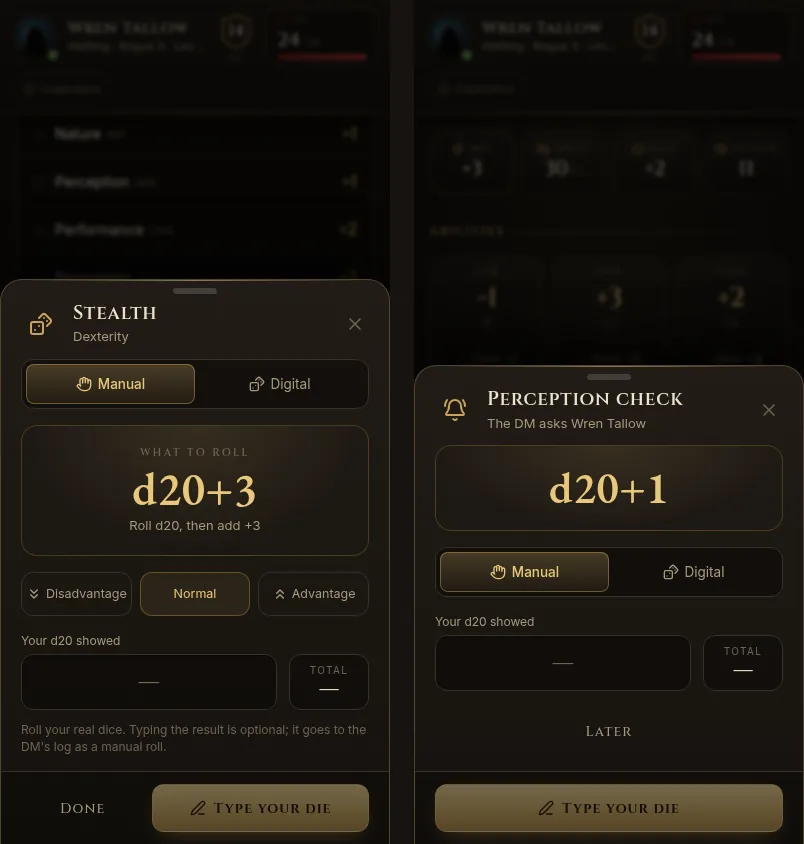
Every roll — a skill, a save, an attack, a request from you — opens the same sheet. The player picks:
- Manual — the phone shows what to roll (“Roll d20, then add +3”). The player rolls real dice. Typing the result is optional; if they do, it goes to your log as a manual roll.
- Digital — Fablekeep rolls for them and the result appears on the phone and in your log.
Advantage and Disadvantage are one tap away. The choice is remembered on the phone.
Your roll requests
Open Request a roll on the quick tools rail to ask for a check, a save, a tool roll, initiative or a death save. Pick the skill, an optional DC, advantage, who sees the results and who rolls, then Ask. Each chosen player gets “The DM asks…” with their bonus already filled in. They can answer now or tap Later; a reminder stays on screen until they do.
See Dice, rolls and the log for the DM’s side.
Who changes what
Players track their own hit points, temporary hit points, death saves and inspiration — those apply at once and are logged. Other changes (restoring a spell slot, adding an item, undoing an action) arrive in your log as requests you approve or deny.
You set this in Settings → Players → Player edits: Ask the DM, Free editing or Off, for everything or per category.
At the table or remote
How a phone behaves depends on where the player sits:
- At the table — the battle map is on the TV; the phone is the character sheet, dice and world.
- Remote — the battle map is on the phone too (the Map tab), with the player’s own token and movement.
In a hybrid campaign you mark who is remote at the start of each session; the phone switches by itself. See Online and hybrid play.