An encounter is a fight you prepare before the session: who’s in it, how hard it is, and where it happens. Encounters belong to the campaign. When it’s time, you run it from the same page (see Running combat).
Create an encounter
- Click Encounters on the left rail.
- Type a name in the box at the top left (“Ambush at the ford…”) and click +.
- The Encounter builder opens.
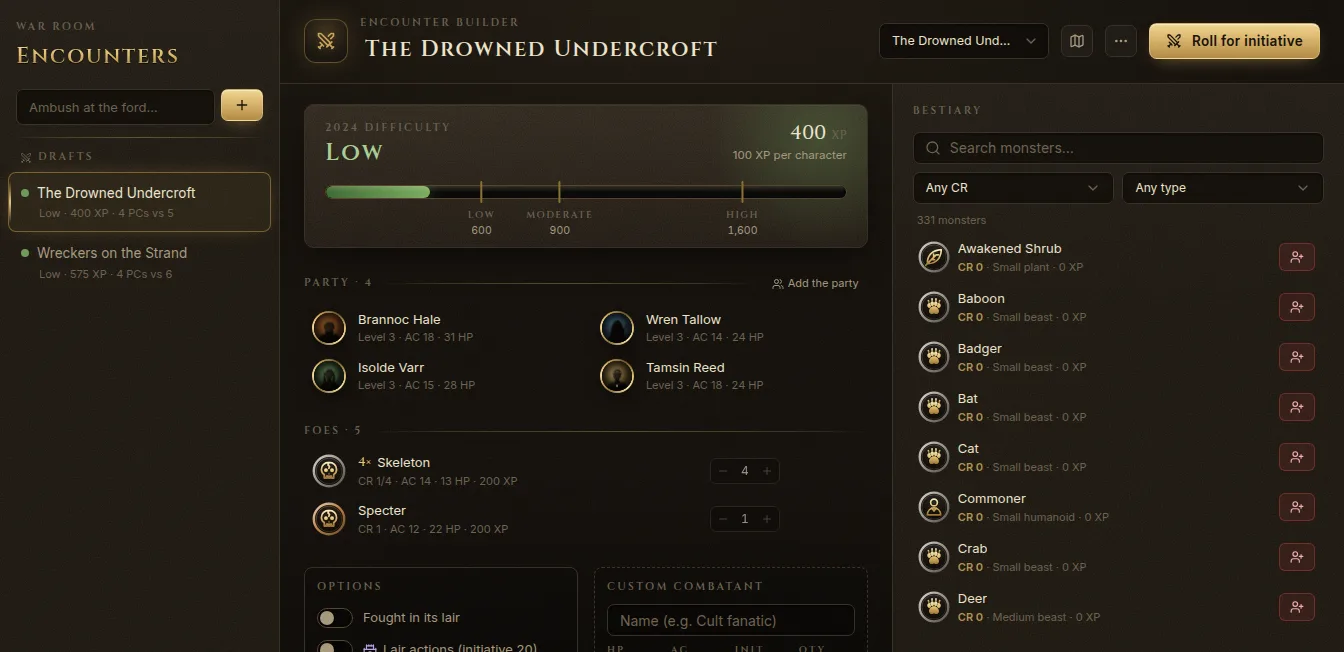
The list on the left groups your encounters as Running, Drafts and Finished, with their XP and how many foes they have.
Add the party and the foes
- Party — click Add the party to bring in the campaign’s characters. Remove anyone who isn’t playing tonight.
- Foes — search the Bestiary on the right (filter by challenge rating and type) and click a monster to add it. Use One more and One fewer to change how many. Preview statblock shows the monster before you add it.
- Allies — add a monster as an ally (Add as an ally) for an NPC who fights with the party.
- Custom combatant — a name, an initiative bonus and a quantity, for anything that isn’t in the compendium.
The bestiary is the SRD 5.2 monster list plus your own homebrew (see The compendium).
Check the difficulty
The bar at the top shows the 2024 difficulty: the encounter’s XP against the party’s budgets for Low, Moderate and High, and the XP per character. Fablekeep also warns you when:
- a monster’s CR is above the party’s average level (it may be deadlier than the budget shows);
- there are more than two monsters per character (the fight can swing wildly);
- the party is empty (add it to compute the budget).
Options
- Fought in its lair — uses lair XP for monsters that have it.
- Lair actions (initiative 20) — adds a lair turn at initiative 20 (losing ties).
- Monster initiative — Roll d20 (each group of identical monsters rolls and shares the result) or 2024 score (the statblock’s fixed initiative score, no dice).
- Notes — tactics, terrain, what the monsters want.
Link a battle map
Choose the encounter’s map in the Battle map menu at the top. Open battle map takes you there, and you can put the creatures on it with Place on map or from the map’s Tokens panel (see Tokens).
Reuse an encounter
Under More (…) you can Duplicate an encounter, for example to build a harder version, or Delete it. A finished encounter’s summary has Run it again.
When everything is ready, click Roll for initiative. See Running combat.