Fablekeep plays sound on the TV: music, up to four ambience loops at once, and one-shot sound effects. It can change the music by itself when the party arrives somewhere or a fight starts. Open Audio on the rail for Audio & Atmosphere.
Where the sound plays
Sound comes out of the TV’s speakers — the TV window or a paired screen — not your laptop. The header shows whether a TV is connected (On TV / No TV).
- Master sets the overall volume; the speaker button mutes the TV.
- Monitor also plays the TV’s audio in your window, for headphones.
- Stop all fades out the music and every ambience layer.
The mixer
The Mixer tab is your live control.
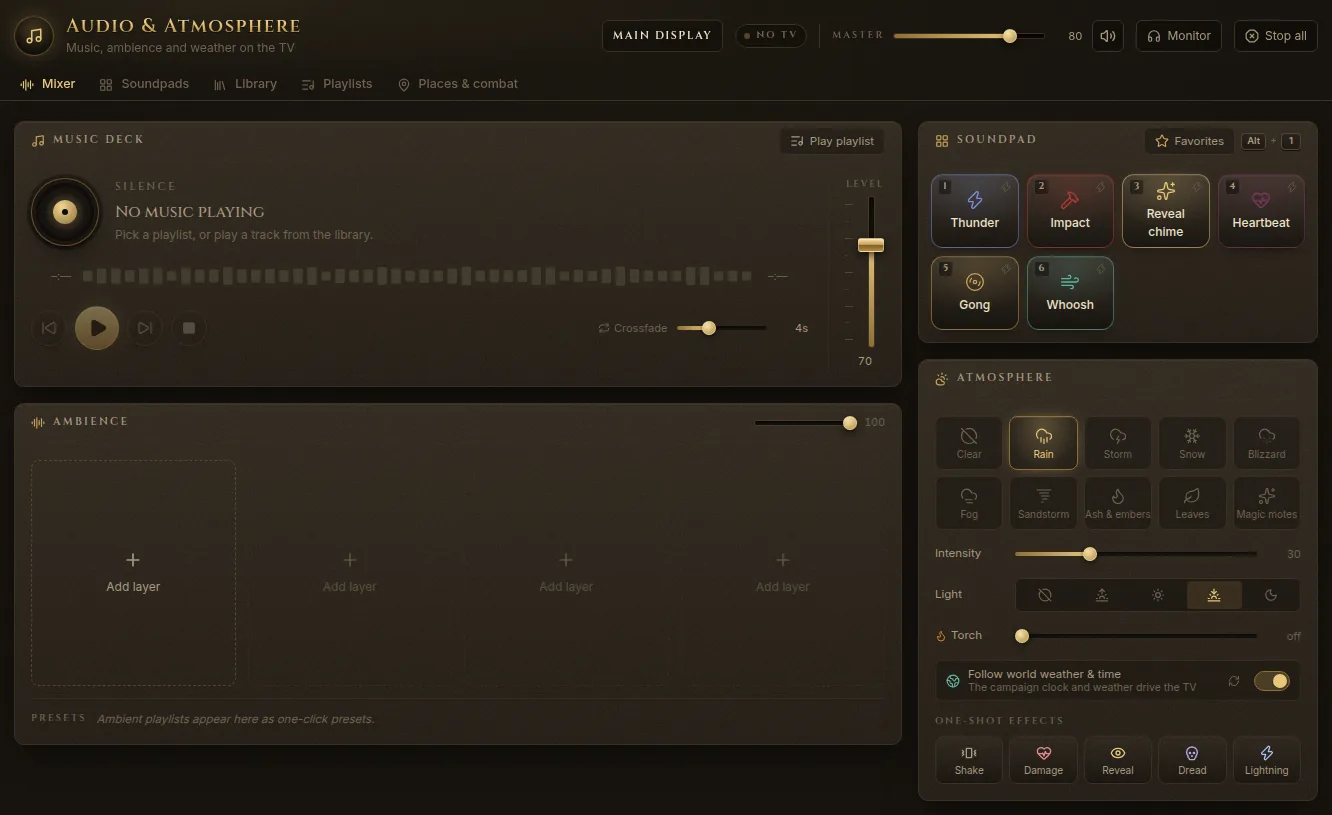
- Music deck — what’s playing, with previous, play/pause, next and stop, its Level, and Crossfade: how long two tracks overlap when the deck moves on. Play playlist starts one of your music playlists.
- Ambience — up to four layers that loop together (rain, wind, a tavern murmur…). Add layer picks a sound; each layer has its own level, and the slider at the top sets them all. Presets applies an ambience preset in one click; Clear removes every layer.
- Soundpad — your sound effects (below).
- Atmosphere — the weather on the TV (Clear, Rain, Storm, Snow, Blizzard, Fog, Sandstorm, Ash & embers, Leaves, Magic motes), its Intensity, the Light (time-of-day tint) and Torch — a warm, breathing pool of light.
- One-shot effects — Shake, Damage (a red flash at the edges), Reveal (a burst of gold sparkles), Dread (a dark pulse closes in) and Lightning (with thunder).
The library
The Library tab holds every sound you can use:
- Built-in sounds, made on the fly — no files needed: rain, thunderstorm, wind, hearth fire, forest stream, night crickets, tavern murmur, cave drips, and effects like thunder, impact, reveal chime, heartbeat, gong and whoosh.
- Your sounds — click Upload audio or drop mp3, ogg, wav, flac or m4a files on the page. Choose whether each one is Music, Ambience or Sound effect. They stay in your world’s folder.
- Add from YouTube — paste a video or playlist link and use it like any other track. It plays through YouTube’s official player, so the TV needs internet while it plays, and only videos that allow embedding work.
Each sound has Play (on the TV, with a crossfade), Layer (add as an ambience layer) or Fire (play once), and a More menu: add to a playlist or soundpad, rename, tags, loop, and Details & license — note who made it and under which license. Star sounds to find them under Starred.
Playlists
The Playlists tab has two kinds:
- Music playlists — tracks that play in order (or Shuffle) with crossfades, with an optional fade in. Group music for travel, towns and battle.
- Ambience presets — up to four loops played together, such as rain, tavern and hearth.
The soundpad
The soundpad keeps your sound effects one key away.
- Open it from the quick tools rail (Soundpad) or with the key left of 1 (` on a US keyboard, º on a Spanish one).
- Click a pad, or press 1…0 while the soundpad or the Audio tab is open. Alt+1…0 fires a pad from anywhere.
- Search the library at the bottom and press + to add a pad.
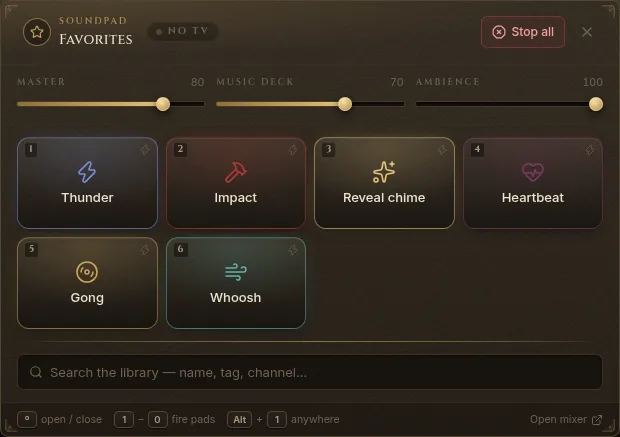
The Soundpads tab lets you build more than one — say “Storm at sea” with thunder one-shots, rain and wind loops. Each pad plays Once, as a Loop (an ambience layer; press again to fade it out) or as Music (on the music deck). A soundpad can also hold a Sound scene: music plus ambience layers that Activate scene crossfades in at once. Use what plays now captures the current mix. Session plan steps and encounters can each have their own soundpad.
Automatic music: places and combat
The Places & combat tab lets the story pick the sound.
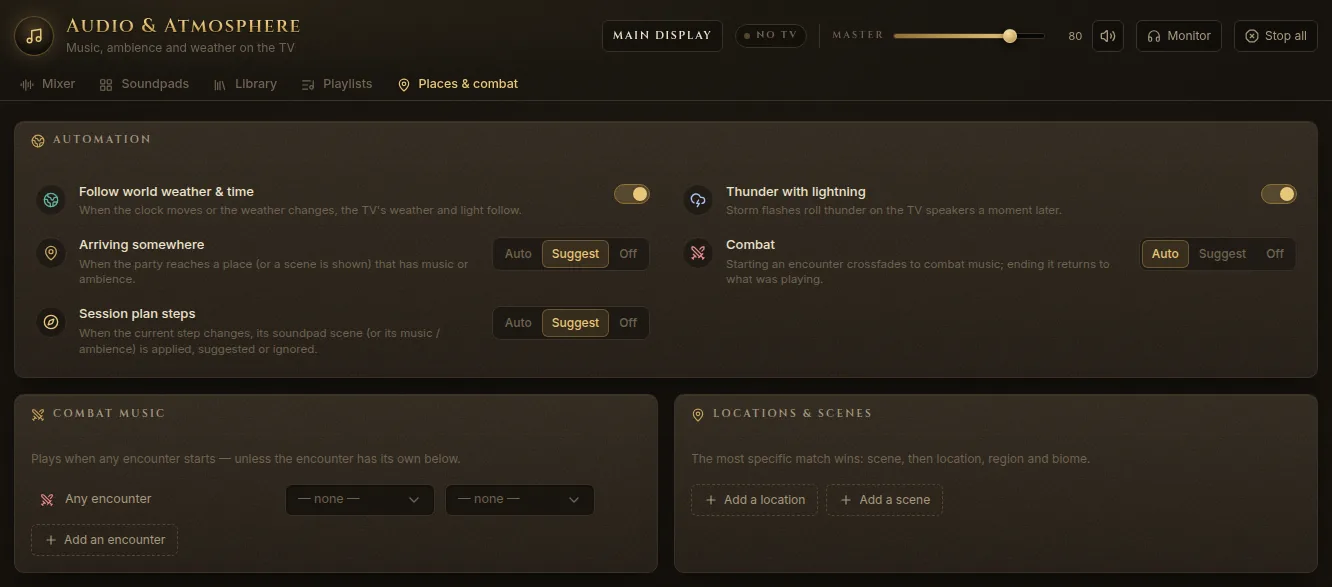
Under Automation:
- Follow world weather & time — when the clock moves or the weather changes, the TV’s weather and light follow.
- Thunder with lightning — storm flashes roll thunder on the TV speakers a moment later.
- Arriving somewhere — when the party reaches a place (or a scene is shown) that has music or ambience.
- Combat — starting an encounter crossfades to combat music; ending it returns to what was playing.
- Session plan steps — when the copilot’s current step changes, its sound scene is applied.
Each automation can be Auto (it just happens), Suggest (Fablekeep asks first, for example “Arrived at Gullhaven — switch the audio?”) or Off.
Then set what plays:
- Combat music — for Any encounter, or for particular encounters.
- Locations & scenes, Regions and Biomes — a music playlist and an ambience preset for each. The most specific match wins: scene, then location, region and biome.
Sound on battle maps
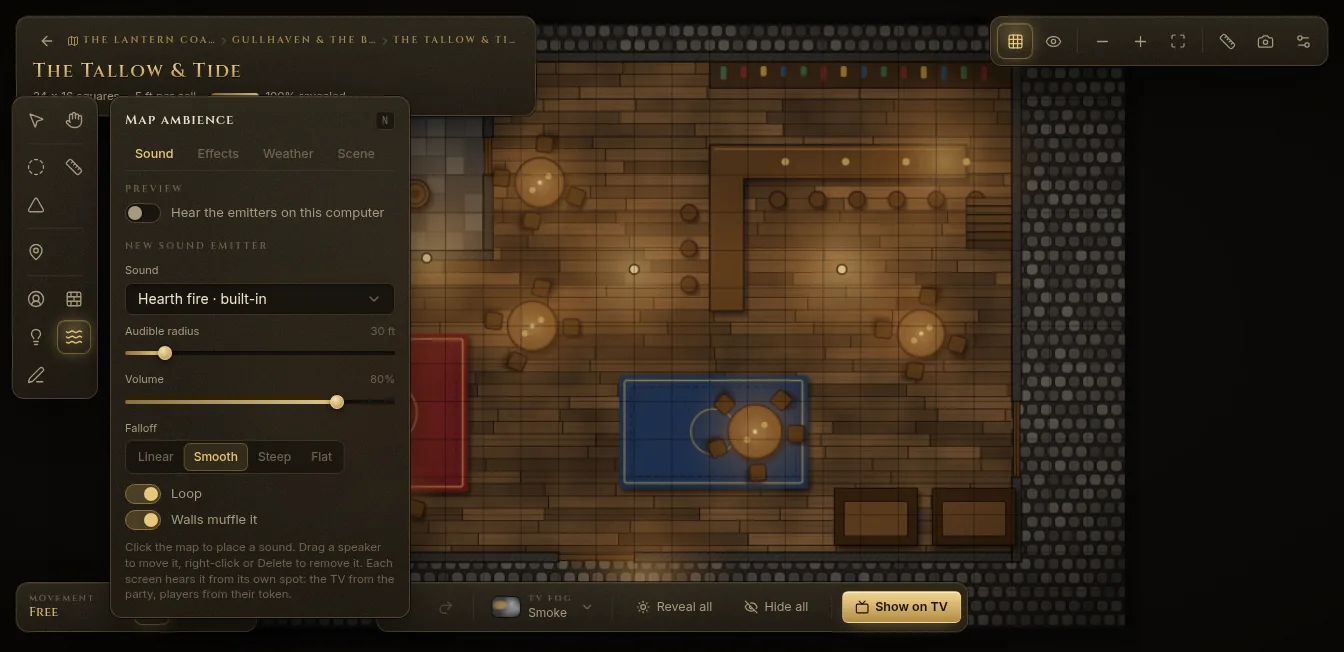
On a battle map, the Ambience tool (N) places sound right on the map:
- Sound — click the map to place a sound emitter: a sound, an Audible radius, a Volume, how it fades (Linear, Smooth, Steep, Flat), whether it loops, and Walls muffle it. Each screen hears it from its own spot: the TV from the party, players from their token. Hear the emitters on this computer lets you preview them.
- Effects — smoke, steam, a fog bank, leaves, ash, embers, runes, motes, shimmer or a video tile, placed as a point or painted as an area.
- Weather — this map’s weather: Off, follow the Campaign, or Manual. Rain and snow stay out of roofed buildings.
- Scene — switch positional sound, water shimmer and fire flicker on or off for this map, and choose where the TV listens from (The party or the TV camera).