Fablekeep gives every session two ways to prepare. Prep is a short checklist in the style of The Lazy Dungeon Master. Plan goes further: the places the party is likely to visit, the scenes, journeys and encounters, with the NPCs and clues of each — and at the table, the Session copilot walks you through it.
Prep: the checklist
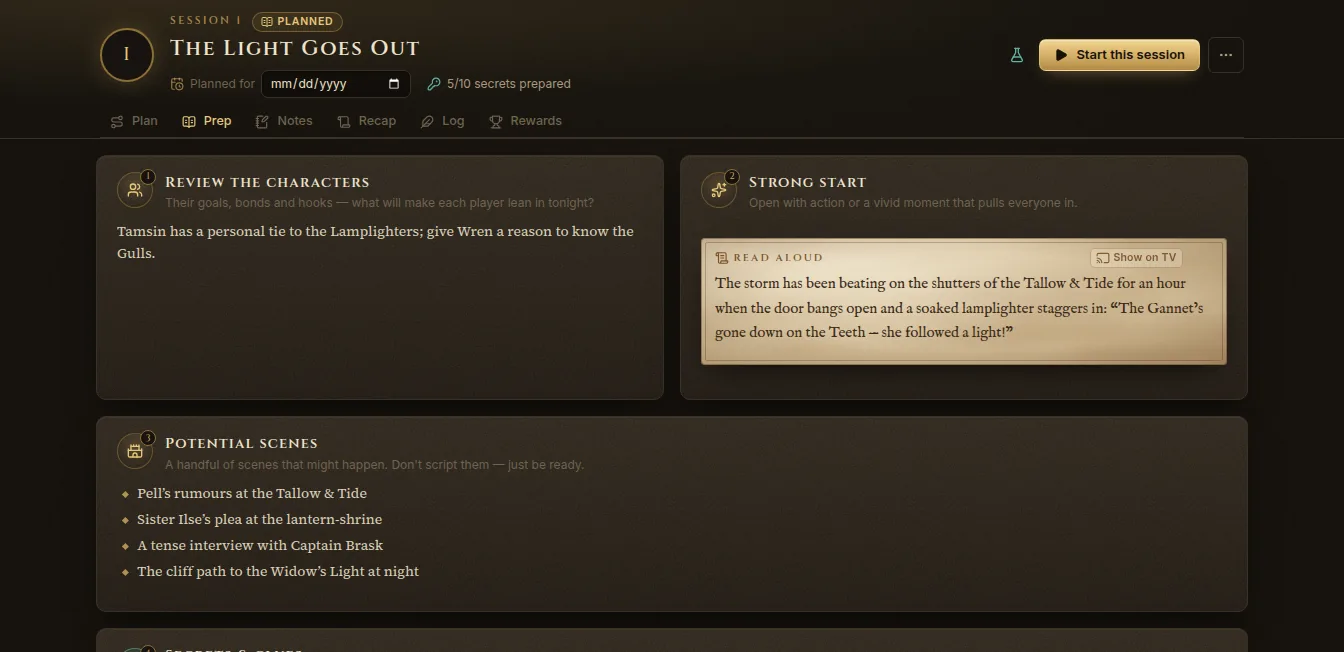
Open a session (Sessions on the rail) and pick the Prep tab. It has eight sections:
- Review the characters — their goals, bonds and hooks.
- Strong start — open with action or a vivid moment. A read-aloud box here has a Show on TV button.
- Potential scenes — a handful of scenes that might happen. Don’t script them.
- Secrets & clues — ten short facts the players could discover. Click Add a secret, or From a quest clue. Mark each one as found during play; the ones nobody found carry over to the next session.
- Fantastic locations — evocative places with three fantastic aspects each.
- Important NPCs — a name, a want and a quirk is enough.
- Relevant monsters — statblocks and foes that fit the scenes.
- Magic item rewards — treasure tied to the characters.
Type @ anywhere to link an NPC, place or quest. The session’s header shows how many secrets you’ve prepared (“5/10 secrets prepared”).
Plan: steps for the copilot
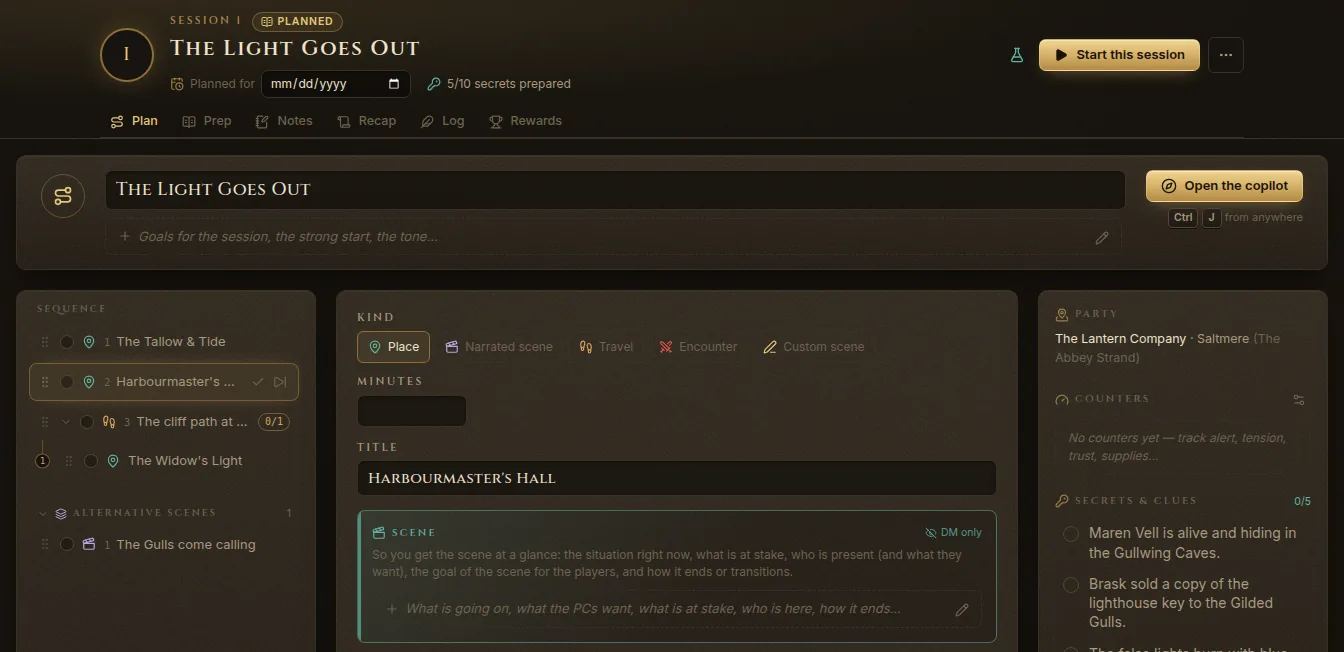
The Plan tab is a sequence of steps. At the top, give the plan a title and a line of goals, the strong start or the tone.
Add steps
Click Add under the step list and choose the kind:
- Place — a place they’ll visit, linked to a location of your world.
- Narrated scene — something you describe and play out.
- Travel — a journey from one place to another (it launches the travel planner; the places after it become stops of the journey).
- Encounter — a fight, linked to a prepared encounter.
- Custom scene — anything else.
Choose Add to the sequence for the main line, or Add an alternative scene for scenes you keep ready for when the players go off script. Drag steps to reorder them.
Fill in a step
Click a step to edit it. Depending on its kind, a step can have:
- a Title, an estimate in Minutes, and the Place (or From / To for travel);
- the Scene — what’s going on, what the characters want, what’s at stake (DM only);
- a read-aloud — boxed text for the players;
- NPCs — each with an attitude, what they want, what they say, what they Can reveal and what they Must not reveal. The Name button opens a name generator: pick a species, occupation and origin, Generate, then Create NPC to add the NPC to the wiki;
- hints to give, linked quests and encounters, a Battle map / scene, loot;
- decisions with options and their consequences;
- handoffs to the next step (“If they take the job…”);
- music, ambience, a soundpad and a TV layout saved in the Display Dock;
- What happens (DM) and notes.
The side panel shows the Party and where it is, Counters (alert, tension, trust, supplies…), the session’s Secrets & clues, the Quests of the session and Pacing — how many steps are done and the time played.
The copilot at the table
Press Ctrl+J from anywhere, click Session copilot on the quick tools rail, or Open the copilot on the Plan tab.
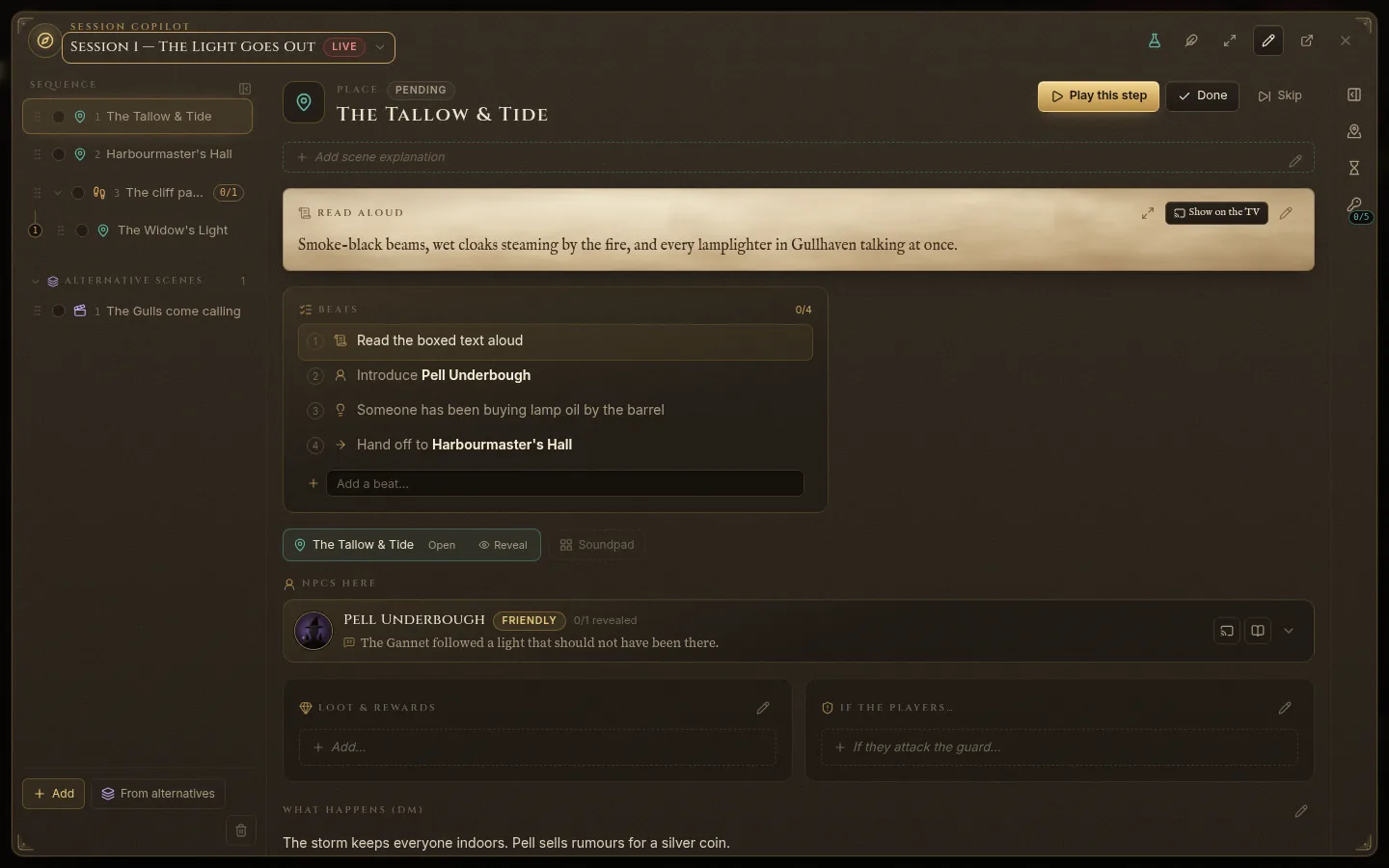
On the left is the sequence of steps and the alternative scenes. The selected step fills the rest:
- Play this step makes it the current step; Done and Skip mark it; Reopen brings it back.
- The read-aloud, with Show on the TV.
- Beats — a checklist built from the step: read the boxed text, introduce each NPC, the hints, the decision, the hand-off to the next step. Tick them as you go; Add a beat… adds your own. A beat can carry private notes on how to run it.
- The place, with Open and Reveal (reveal it to the players).
- NPCs here, with their attitude, what they say and what they can reveal — tick each reveal as it happens. Their portrait can go on the TV.
- Loot and rewards, “If the players…”, and What happens (DM).
When you tick a hint or a reveal linked to a clue, the clue is marked as delivered too.
Following the party
The copilot watches where the party is. When the party arrives at a place that matches a step, it tells you — “The party is at The Tallow & Tide — that matches …” — with View it. Travel steps follow the journey: the journey stops by itself at each stage and the copilot moves to that stage.
Alternative scenes
When the players go somewhere you didn’t expect, open an alternative scene and click Play this scene now — or Insert after the current step to slot it into the sequence.
Other controls
- Note — a quick note to the session log.
- Focus mode — a big read-aloud and the next beat; → advances, Esc exits.
- Edit / Done editing — change the step right in the copilot.
- Open the full plan — back to the Plan tab.
- Plan notes — the party, counters, pacing and clues, without leaving the copilot.