Tavern names, road encounters, rumours for a silver coin — random tables keep them all, ready to roll at the table.
Open the tables
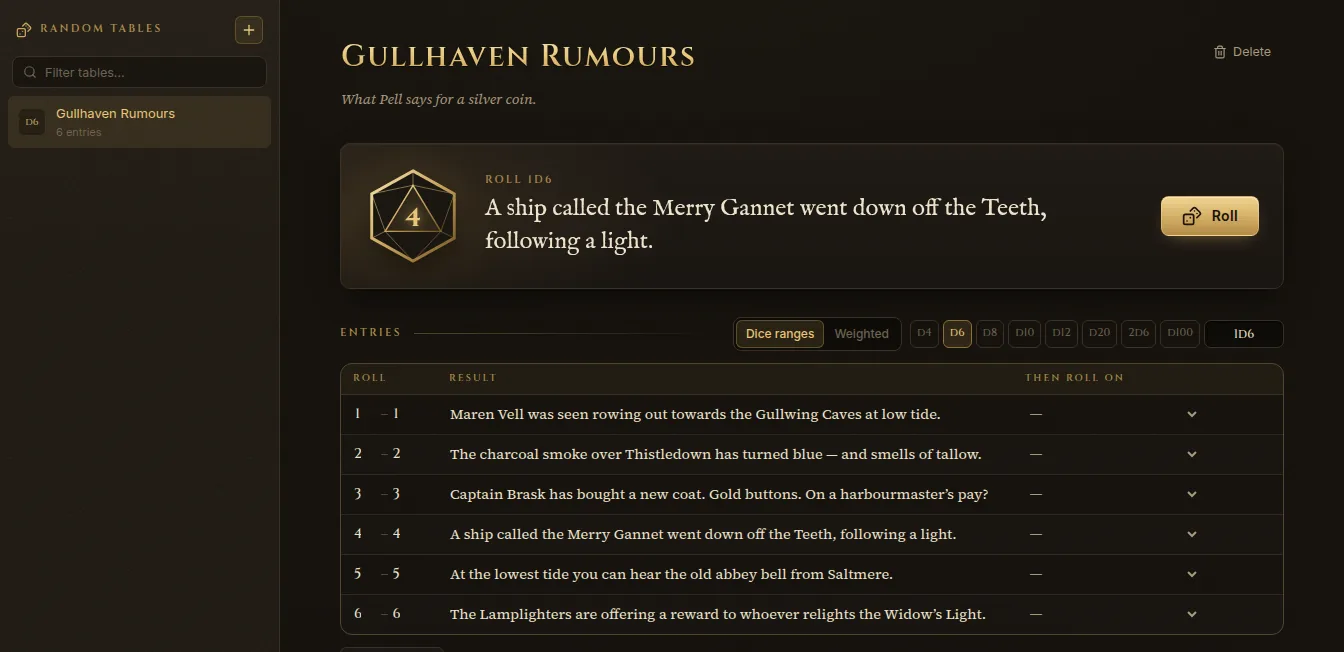
Open Knowledge on the rail and click Random tables. Or press Ctrl+K and type “tables”. Your tables are listed on the left; Filter tables… finds one by name.
Make a table
- Click + (New table) above the list.
- Give it a name and, if you like, a line saying what it’s for (“What Pell says for a silver coin”).
- Choose how it’s rolled:
- Dice ranges — pick the die (d4, d6, d8, d10, d12, d20, 2d6, d100) and give each entry a range of results.
- Weighted — give each entry a Weight; heavier entries come up more often.
- Click Add entry for each result, or Paste lines to add many at once — one result per line; leading numbers and bullets are removed.
- With dice ranges, Even out ranges spreads the entries evenly over the die. If some results aren’t covered, Fablekeep tells you how many.
Inside a result you can write:
[[2d6]]— inline dice, rolled each time (“[[2d6]] goblins”);[[table:Name]]— roll on another table too.
You can also pick a table under Then roll on for an entry, to chain tables.
Roll
Click Roll. The die tumbles and the result appears at the top. Rolls you make during the session are kept under This session’s rolls, where you can Copy a result or Insert into an entry — append it to a wiki page.
You can also roll from anywhere: press Ctrl+K and type the table’s name (the command reads “Roll: Gullhaven Rumours”).
Put a table in a page
In any wiki page, type / and choose Random table, then pick the table. The table sits in the page; click its die to roll at the table without leaving your notes.
Random encounters on the road
When the party travels, Fablekeep can check for random encounters and roll an encounter table for the terrain they’re crossing. Set it up in the campaign’s Campaign settings, on the Encounters tab:
- Frequency — one check per travel day, or one per watch (three a day).
- Check die — an encounter happens on a 1 in N.
- Biome encounter tables — each terrain uses a Built-in table until you choose one of your own. Copy turns the built-in rows into an editable random table in the Archive, so you can change them.
On a journey, Roll the table in the Journey Runner rolls the table of the terrain under the party and creates a quick encounter from it.