Fablekeep works fully without AI. If you want a hand with the busywork, it has two optional helpers that use your own account with an AI provider. Both are off until you turn them on, and nothing from your worlds goes to any provider while they are off.
What the AI can do for you
- The Claude assistant. Connect Claude Desktop or Claude Code, with your own Claude account, and ask it to search your world, flesh out a region, populate a settlement, write NPCs, prepare a session or draft a recap. It works on the world you have open, with your own content and the assets you own. See Connect Claude (MCP).
- AI text helpers. Small, quick drafts — NPC names in the session planner and session recaps — using a cheap model of your choice: OpenAI, OpenRouter, Anthropic, or a local model such as Ollama or LM Studio. See AI text helpers.
What the AI never does:
- It never makes art. Fablekeep has no image generation. Use your own pictures and the asset packs you own: upload them on any entry or import packs (see Importing maps and asset packs).
- It never decides for you. Everything the assistant creates or changes is a draft, marked AI draft, that you review, accept or revert.
- It never reaches the TV on its own. Keys stay on your computer and are never shown on the TV, and the assistant can’t change campaign state (the clock, fog of war, the timeline) unless you allow it.
Turn AI features on
AI features are off by default. While they are off, every AI button is hidden and the app refuses AI requests.
- Open Settings (Ctrl+,) and go to AI features.
- Turn the AI features switch on.
- Under Set up a provider, click AI text provider or Claude assistant to set one up.
Two new sections appear in Settings: Claude (MCP) and AI text.
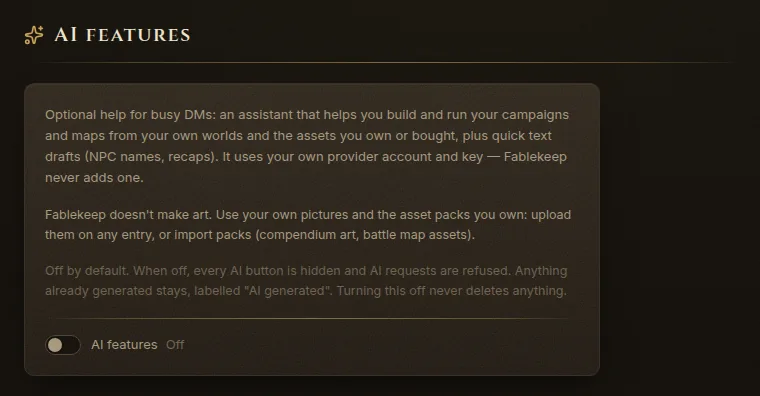
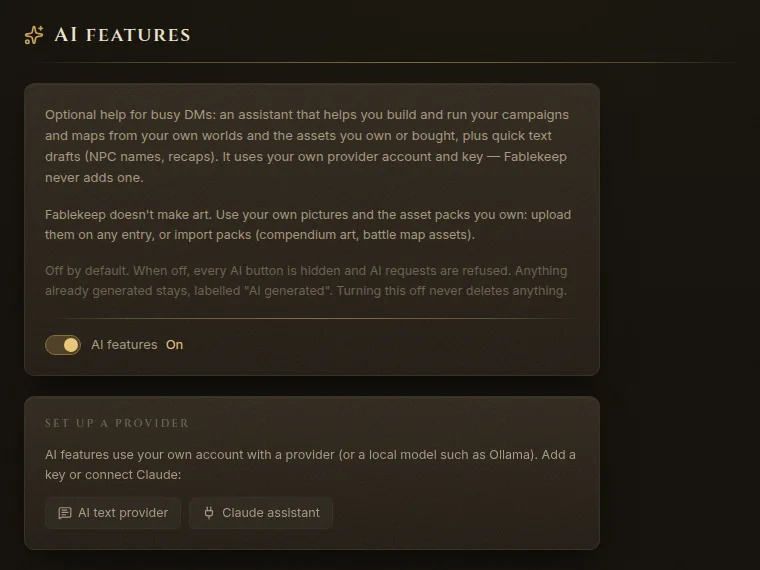
Turning AI features off again never deletes anything. Whatever the AI already drafted stays in your world, still labelled.
Your account, your key
Fablekeep doesn’t include an AI provider or charge for one. You bring your own:
- For the assistant, your own Claude account (Claude Desktop or Claude Code).
- For the text helpers, your own API key with an OpenAI-compatible service or Anthropic, or a local model on your computer, which needs no key at all.
Your provider’s terms, prices and privacy policy apply. What the AI works with travels between Fablekeep and the provider you chose, never through us. With a local model, nothing leaves your computer.
Everything is a draft you review
When Claude creates or edits a place, an NPC, an encounter or a map, it is marked AI draft and listed in the Claude activity feed. You can open it, change it, Accept it (which only removes the badge) or Revert it. Read and edit AI text before you show it to your players: it can be wrong, generic or not quite your world.